
It’s Saturday morning and there’s a pile on the kitchen table: a brown envelope from HMRC you haven’t dared open, a council tax letter full of numbers, an energy bill that looks higher than last month, and a school form due on Monday. Then your phone buzzes with a text saying a parcel couldn’t be delivered and you need to “pay a small fee” to rebook it.
This is life admin, and AI assistants such as ChatGPT, Claude and Gemini are genuinely good at it. They can explain a confusing letter in plain English, help with forms, draft a firm but polite complaint, talk you through a tech problem and give a suspicious message a second look. This guide shows you how, with copy-paste prompts, honest warnings, clear privacy rules and links to our step-by-step guides.
Quick answer: Paste in a letter with your personal details removed and ask AI what it says, what you need to do and by when. Use it to draft complaints, plan renewals, fix tech and organise documents. If a message might be a scam, don’t click, reply or pay: check with the organisation using its official website, and forward scam texts to 7726 and emails to report@phishing.gov.uk. Never paste in passwords, full account numbers or your National Insurance number.
New to AI? Start with our complete beginner’s guide.
In this guide
- Start with your situation
- What AI can and can’t do for your paperwork
- Understand confusing official letters
- Get help filling in forms
- Spot scam texts, emails and calls
- Sort out tech problems yourself
- Write complaints that get results
- Stay on top of renewals, bills and contracts
- Keep your documents organised
- Where AI gets life admin wrong (and how to stay safe)
- A 20-minute weekly life admin routine
- Which AI tools should you use?
- FAQ
Start with your situation
Find the line that sounds most like your week, then jump to the section you need:
- A letter has left you confused or worried: see official letters.
- There’s a form to fill in by Friday: see forms.
- A text, email or call looks a bit off: read scams before you do anything else.
- Something isn’t working, or you’ve been badly treated: see tech problems and complaints.
- You just want fewer things to catch you out: see renewals and organising documents.
What AI can and can’t do for your paperwork
AI is good at: explaining jargon in plain English, pulling out what a letter wants you to do and by when, drafting letters and complaints in the right tone, breaking tech problems into simple steps, turning renewals into a checklist, and pointing out the warning signs of a scam.
AI is not good at: knowing the facts of your account (it can’t see your tax record, energy account or bank), giving guaranteed legal, tax or benefits advice, or confirming that a message is genuine. It can also misread a number or quote a rule that’s out of date.
The simple rule: let AI do the explaining, drafting and organising, then check anything important with the organisation itself, GOV.UK, or a free adviser such as Citizens Advice.
Understand confusing official letters
Letters from HMRC, the council, the DWP or your energy supplier often bury the one thing you need to do on page two. This is where AI shines.
Type out the key parts or take a photo, but remove or cover your name, address, account and reference numbers and National Insurance number first. You don’t need them for an explanation.
Prompt: Explain this letter in plain English
I've received this letter from [organisation, e.g. HMRC / my council / my energy supplier]. I've removed my personal details.
[paste the text of the letter]
Please explain in plain English:
1. What this letter is about, in 2 or 3 sentences.
2. Whether I need to do anything, and if so, what.
3. Any deadlines or amounts mentioned.
4. Any words or terms I might not understand.
Don't guess about anything that isn't in the letter.
A useful follow-up: “Write me a short reply asking them to explain [the confusing part].” Our step-by-step guide to understanding official letters and forms with AI has more examples, and if the letter is about money from work, see how to use AI to understand your payslip or how to understand your pension.
A quick scam check for letters: scammers send letters too. If a letter asks you to pay or call a number, check the organisation’s contact details on its official website (or for government services, by searching GOV.UK) rather than using the number printed on the letter.
Get help filling in forms
AI shouldn’t fill in an official form for you (never give it your login details), but it can make the job much less daunting.
Use it before you start (to gather what you need), while you fill it in (paste in a question and ask what it’s really asking), and for free-text boxes (describe your situation and ask for a clear, honest answer).
Prompt: Help me get ready for a form
I need to fill in [name of form, e.g. a school admissions form / a passport renewal / a council tax single person discount application].
Please give me:
1. A checklist of the information and documents I'll probably need to have ready.
2. A plain-English explanation of any questions people often find confusing.
Please remind me to check the official guidance for this form, because requirements can change.
Never let AI exaggerate or add details that aren’t true, and read every word before you submit.
If you’re self-employed or have extra income, our guide to preparing your Self Assessment tax return with AI walks through getting your figures in order before you log in to HMRC.
Spot scam texts, emails and calls
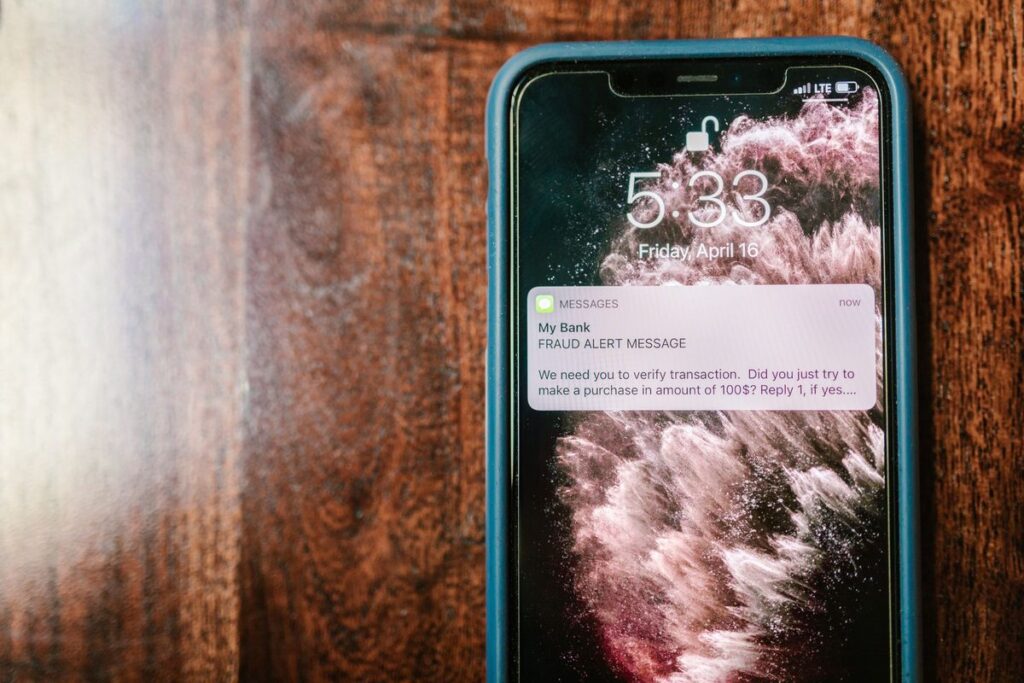
Scams are the most important part of life admin to get right. The National Cyber Security Centre (NCSC) warns that they’re getting smarter and some even fool the experts. As of October 2026, the NCSC says it has received more than 60.5 million reports of scams from the public.
The NCSC’s tell-tale signs are worth learning. A scam message often:
- Claims to be from someone official, such as your bank, a solicitor, your doctor or a government department.
- Gives you a deadline, such as “within 24 hours”, often with a threat of a fine.
- Plays on your emotions: panic, fear, hope or curiosity.
- Offers something scarce, like tickets, money or a “too good to miss” deal.
- Ties in with current events or times of year, such as tax deadlines.
Citizens Advice adds more warning signs: being asked to pay quickly, being asked to pay in an unusual way (such as vouchers or a money transfer service), being asked for passwords or PINs, and not having anything agreed in writing.
How AI can help (and how it can’t)
AI is a good second pair of eyes. Copy the text of a suspicious message (without clicking any links) and ask it to point out warning signs. Slowing down is exactly what scammers don’t want.
Prompt: Is this message a scam?
I've received this [text / email / WhatsApp message]. I haven't clicked anything.
[paste the message, with any personal details removed]
Please:
1. List any warning signs that this could be a scam (urgency, threats, requests for money or details, odd links or sender details).
2. Tell me the safe way to check it, without using any links or phone numbers in the message.
Be cautious: if you're not sure, say so.
Never treat “AI says it looks fine” as proof. AI can’t check where a message came from. The NCSC advises contacting the organisation directly using details from its official website (or your bank card or statement), not the numbers or links in the message.
What to do with a scam message
- Texts: forward them to 7726 for free. Your phone provider can then investigate and block the sender.
- Emails: forward them to report@phishing.gov.uk, the NCSC’s reporting service.
- Anything mentioning HMRC: HMRC asks you to forward suspicious emails to phishing@hmrc.gov.uk and texts to 60599. GOV.UK says HMRC will only ever email you about a tax rebate, or ask for personal or payment information, from an address ending in hmrc.gov.uk, and will never tell you about a tax rebate by text.
- Calls “from your bank”: Citizens Advice says to hang up and call 159, a service that connects you securely with your bank (check your bank uses it). Or wait 5 minutes so the line is clear and call the number on your card.
- If you’ve lost money or been hacked: tell your bank straight away, then report it to Report Fraud at reportfraud.police.uk or on 0300 123 2040 if you live in England, Wales or Northern Ireland. In Scotland, call Police Scotland on 101.
For more examples and a step-by-step checklist, read our guide to using AI to spot scam emails and texts. If you’re helping a parent or grandparent stay safe, our guide on helping elderly parents with technology covers scam awareness too.
Sort out tech problems yourself

The printer won’t print or the laptop won’t connect to the Wi-Fi. AI makes a surprisingly good tech helper: it’s patient and never sighs at you.
Give it the details a good IT person would ask for: your device, what you were trying to do, the exact error message and what you’ve already tried.
Prompt: Help me fix a tech problem step by step
I'm not very technical, so please explain simply.
Device: [e.g. Windows 11 laptop / iPhone / Android phone / HP printer]
What I'm trying to do: [e.g. print a PDF / connect to home Wi-Fi]
What happens instead: [describe it, including the exact error message]
What I've already tried: [e.g. restarted it]
Please give me numbered steps to try, one at a time, starting with the simplest and safest. Tell me what I should see after each step. If it sounds like a hardware fault or something I shouldn't try myself, tell me.
If you need to call the manufacturer or provider, AI can summarise the problem and everything you’ve tried. Our guide to dealing with tech support using AI shows exactly how.
One firm rule: never let anyone, human or AI, talk you into installing remote-access software or reading out a code sent to your phone unless *you* contacted a company you trust. That’s a classic scam.
More tech help:
- How to use AI to choose a new phone or laptop.
- How to use AI to set up a new phone.
- How to use AI to organise your digital photos.
While you’re sorting your tech, the NCSC recommends a few simple habits: use a strong, separate password for your email, install the latest software and app updates, and turn on 2-step verification. For passwords, it suggests combining three random words, or using a password manager. AI can explain how to turn on 2-step verification for a particular app, but never type a real password into an AI chat.
Write complaints that get results
A good complaint is calm and specific: what happened, when, what you’ve done so far and exactly what you want next, with a reasonable deadline. AI is brilliant at turning an angry rant into exactly that.
Prompt: Turn my rant into a firm, polite complaint
Please help me write a complaint [email / letter] to [company or organisation].
Here's what happened, in my own words: [describe it, including dates, amounts and who you spoke to].
What I want: [e.g. a full refund / a replacement / the repair done / the bill corrected].
Please write it so it's calm, firm and polite, under 250 words, with the key facts in order, a clear request and a reasonable deadline for a reply. Leave placeholders for my name, address and account or order number so I can add them myself.
Keep copies of everything and note phone calls (date, time, name, what was said).
If you need advice on your rights, the Citizens Advice consumer helpline (0808 223 1133, Monday to Friday, 9am to 5pm) can help with problems such as faulty goods or energy. Its advisers can’t make the complaint for you, but they can explain the law that applies to your situation.
Step-by-step guides for common complaints:
- How to use AI to write a complaint letter that gets results
- How to use AI to write a letter to your landlord about repairs
- How to use AI to understand your energy bill and meter readings, handy before you dispute a bill
For any other letter or email, from a formal request to a tricky message to a neighbour, our guide to writing anything with AI has prompts for every tone.
Stay on top of renewals, bills and contracts
Car and home insurance, broadband, the MOT, your passport, the gym. Many of us lose money simply because a renewal sneaks past us. AI can build a renewals list in minutes, then help you compare and haggle.
Prompt: Build my renewals calendar
Here's a list of my regular bills, contracts and renewals, with the dates I know: [e.g. car insurance renews March, broadband contract ends June, passport expires 2028, MOT due August].
Please turn this into a simple table with: what it is, renewal or end date, a reminder date 4 weeks before, and one thing to check or compare before it renews.
Then tell me which common household renewals I might have forgotten to list.
Copy the reminder dates into your phone’s calendar so the plan leaves the chat. When a renewal letter arrives, ask AI to explain what’s changed and what to ask for when you ring up. These guides go into detail:
- How to use AI to organise your calendar and life admin
- How to use AI to understand insurance policies, including the small print and exclusions
- How to use AI to compare broadband and mobile deals before your contract ends
- How to use AI to cut your household bills
For the bigger money picture (budgets, savings and debt), see our pillar guide to AI for household money.
Keep your documents organised

When a form asks for “a recent utility bill”, you want to find one in a minute, not an afternoon. AI can design a simple system for paper files, laptop folders or a cloud drive.
Prompt: Design a simple filing system for my paperwork
I want a simple system to organise our household paperwork. We have [paper letters / PDFs and emails / both].
Our household: [e.g. 2 adults, 2 children, renting, one car, one of us self-employed].
Please suggest:
1. 8 to 10 main categories (folders) and what goes in each.
2. A simple naming pattern for digital files, with examples.
3. What's usually worth keeping and what can be shredded, with a reminder to check official guidance for tax records.
AI’s suggestions on how long to keep things are general, so check GOV.UK for tax records. Moving house soon? Our guide to planning a house move with AI includes a checklist of who to tell and which documents to keep handy. And for appointments and health paperwork, see how to prepare for a doctor’s appointment with AI.
Where AI gets life admin wrong (and how to stay safe)
AI isn’t an expert on your case, and it can make mistakes that matter.
- It can be confidently wrong. AI can misread a figure, mix up dates or quote a rule that has changed, and it sounds just as sure either way. Check deadlines, amounts and rules against the original letter, the organisation or GOV.UK.
- It doesn’t know your account. It can’t see whether you’ve already paid or what your supplier’s records say. If something doesn’t add up, contact the organisation.
- It isn’t a lawyer, accountant or benefits adviser. For tax disputes, benefits decisions, debt, eviction or court papers, use AI to understand the basics and prepare questions, then get free, qualified advice from Citizens Advice or the relevant official service.
- It can’t confirm a message is genuine. Treat its scam check as a prompt to slow down, never as permission to click.
Privacy: what never goes into an AI chat
AI tools may store your conversations and, depending on your settings, use them to improve their systems. Never paste in:
- Passwords, PINs or one-time security codes.
- Full bank, card or account numbers.
- Your National Insurance number, passport number or driving licence number.
- Login details for HMRC, your bank or any other account.
Use placeholders such as [ACCOUNT NUMBER] or [MY NAME], cover details before taking a photo, and add the real information yourself at the end. Many AI apps also let you turn off chat history or training in their settings. Our beginner’s guide to using AI in everyday life explains privacy settings in more detail.
A 20-minute weekly life admin routine
A short, regular slot stops paperwork piling up. Pick a time, such as Sunday evening with a cup of tea:
- Gather the week’s post, emails and texts that need action.
- Delete or report anything suspicious (7726 for texts, report@phishing.gov.uk for emails).
- Ask AI to summarise any letters and list what needs doing, with personal details removed.
- Do the quick jobs straight away and add the rest to your calendar with a deadline.
- File everything in its folder.
Want to start now? Copy the letter prompt and paste in this week’s most confusing letter:
Try it yourself with ChatGPT
I've received this letter from [organisation, e.g. HMRC / my council / my energy supplier]. I've removed my personal details.
[paste the text of the letter]
Please explain in plain English:
1. What this letter is about, in 2 or 3 sentences.
2. Whether I need to do anything, and if so, what.
3. Any deadlines or amounts mentioned.
4. Any words or terms I might not understand.
Don't guess about anything that isn't in the letter.
Which AI tools should you use?
- ChatGPT, Claude or Gemini for explaining letters, drafting complaints, tech help and planning. The free versions are fine for everything in this guide. New to them? Our complete beginner’s guide to using AI in everyday life shows you how to get started.
- GOV.UK for official services, forms and contact details, so you’re never sent to a copycat site.
Running a household with children too? Our guide to AI for family life covers school forms, weekly plans and chores.
Get the free AI Agents Playbook
50 practical AI workflows, plus one practical how-to a week in your inbox.
Free. No spam. Unsubscribe any time.
Related guides
- How to Use AI to Understand Official Letters and Forms
- How to Use AI to Spot Scam Emails and Texts
- How to Use AI to Write a Complaint Letter That Gets Results
- How to Use AI to Deal With Tech Support (and Actually Get It Fixed)
- How to Use AI to Organise Your Calendar and Life Admin
FAQ
Is it safe to upload a letter to ChatGPT or another AI?
Yes, if you remove or cover your personal details first (name, address, account and reference numbers, National Insurance number). Never share passwords or security codes.
Can AI tell me for certain if a text or email is a scam?
No. It can point out warning signs, but it can’t check where a message came from. Don’t click links or call numbers in the message. Contact the organisation using details from its official website, and forward scam texts to 7726 and scam emails to report@phishing.gov.uk.
What if AI’s explanation doesn’t match what the organisation tells me?
Go with the organisation, or get free advice from Citizens Advice. AI can be wrong or out of date, and it doesn’t know the details of your account.
Reference: NCSC: How to spot a scam email, text message or call, NCSC: Phishing scams, how to spot and report them, NCSC: Report a scam text, NCSC: Top tips for staying secure online, NCSC: Three random words, GOV.UK: Avoid and report internet scams and phishing, GOV.UK: Report suspicious HMRC emails, texts and phone calls, Citizens Advice: Check if something might be a scam, Citizens Advice: Report a scam, Citizens Advice: Contact the consumer service, Report Fraud